How to sign up at Smokos
Here's exactly what happens, in order, so you're not guessing at any step.
Before you start
Signing up at Smokos is quick, but grab two things first so you don't get stuck halfway. You'll need to be 18+ and have your own details handy - Smokos runs one account per person, so it has to be you, not a mate's leftover login.
Have ready:
email, username, password, country, mobile number, referral code (optional).
Accept the terms and conditions. That one checkbox also covers your age and eligibility declarations.
That's the lot. Your full name, date of birth and address aren't part of the registration form - they get collected later, as part of ID verification (KYC), not at sign-up.
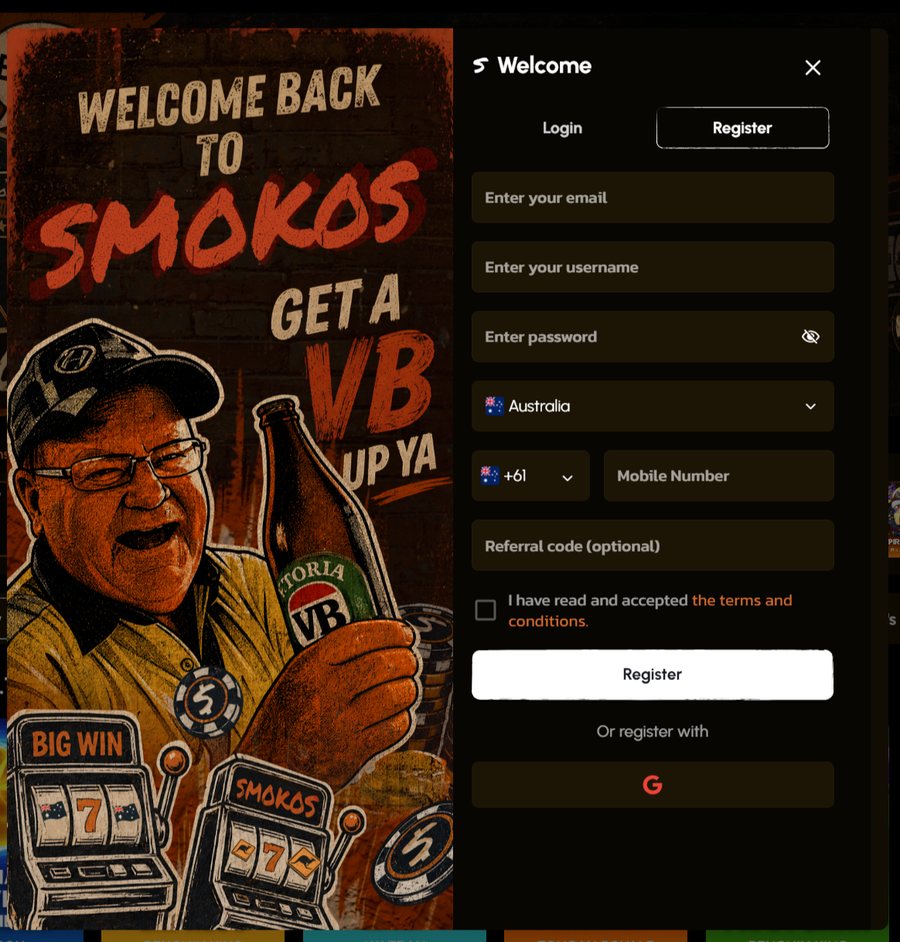
The sign-up, step by step
Hit the join button to open the registration form.
email, username, password, country, mobile number, referral code (optional).
You can log in later with your username or your email.
Your account runs in NZD, and it can't be changed afterwards.
Accept the terms and conditions. That one checkbox also covers your age and eligibility declarations.
That's it - account created. Log straight in and you're ready to make your first deposit and grab the welcome package.
Making your first deposit
Once you're logged in, head to the cashier and put your first deposit down. The minimum to get the ball rolling is $20. Smokos takes the usual suspects:
Prefer coins? Bitcoin, Ethereum, Tether (USDT) are all in the mix, for deposit and withdrawal alike. Just note the welcome package is for fiat deposits only, like cards and Apple Pay.
Whichever method you use, your deposit has to be wagered at least once before you can withdraw, and your ID verification has to be cleared first too.
Claiming the welcome package
The welcome offer kicks in on your first fiat deposit (a card or Apple Pay, for example) - no code to type in, as long as you put down at least the $20 minimum. Crypto deposits don't trigger it. Here's what's on the table:
18+. New players only. Min. deposit $20. Wagering 40x. T&Cs apply.
It's spread across your first three deposits rather than dumped on one. Every part carries 40x wagering, and the bonus balance expires 5 days after activation.
Signed up? A couple of quick answers
What details do I need to register?
How do I claim the welcome offer?
Can I change my currency after signing up?
Can I withdraw to the card I deposited with?
When does verification kick in?
Ready to sign up to Smokos?
$20 to get going, and the welcome package starts with your first fiat deposit (a card or Apple Pay, for example). Have a crack.
18+ only. New players only. Min. deposit $20. Wagering 40x. T&Cs apply.